
mikan architecture
Learn how mikan connects platform adapters, conversation offices, sessions, agent, sandbox, vault, and web portals.
1. System overview
Section titled “1. System overview”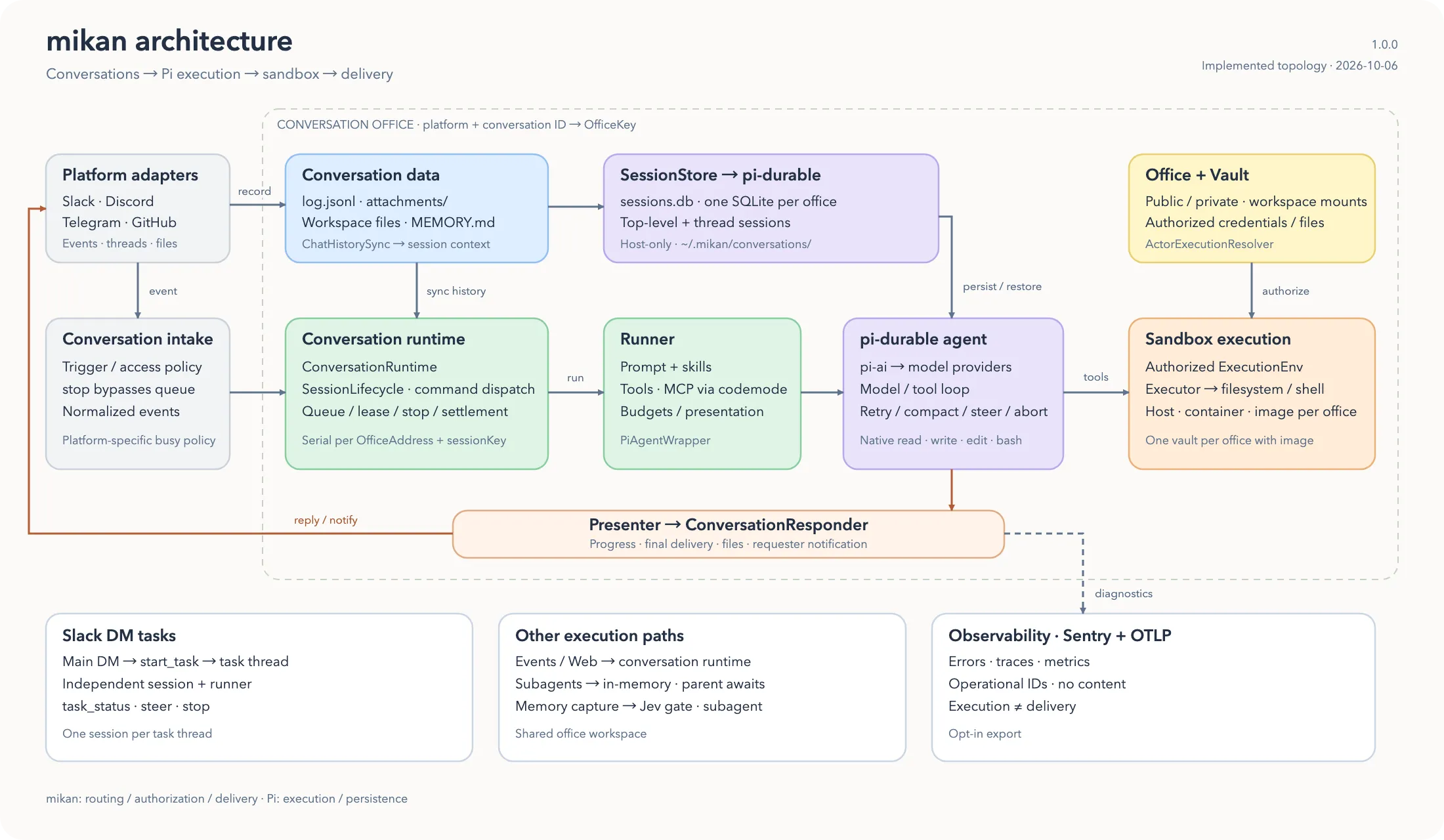
2. Main layers
Section titled “2. Main layers”A. Platform adapter layer
Section titled “A. Platform adapter layer”For the shared adapter contract, see Platform adapters. Platform details are documented for Slack, Discord, Telegram, and GitHub.
src/adapters/slack/*src/adapters/telegram/*src/adapters/discord/*src/adapters/github/*
Responsibilities:
- receive native Slack / Telegram / Discord events or poll GitHub issues and pull requests
- convert them to unified
ConversationEvent,ConversationMessage, andConversationRespondervalues, each carrying the conversation’sOfficeAddress - compute
sessionKeyaccording to platform rules - wrap platform differences such as replies, typing, working state, and file upload
Raw platform identifiers stay at these external I/O boundaries. Everything inward addresses a conversation by its OfficeAddress.
B. Core orchestration layer
Section titled “B. Core orchestration layer”src/main.tssrc/cli/boot.tssrc/runtime/conversation-runtime.tssrc/adapters/intake.tssrc/adapters/commands/manifest.tssrc/sessions/session-store.tssrc/sessions/chat-history-sync.ts
Responsibilities:
- resolve argv into a boot plan (
src/cli/boot.ts), then execute it: read env /settings.json, refuse to start while a State migration is pending, build theWorkspace, and start the selected platform bots - create
ConversationRuntimeas theMessagingEventHandlerfor each platform bot - recognize the
stopmagic word in conversation intake (src/adapters/intake.ts) before trigger policy and queueing - dispatch control commands such as
/login,/session, and/newinsideConversationRuntime.runSession; the command inventory that adapters register/route from lives insrc/adapters/commands/manifest.ts - key per-session state and queues by office address plus session key, so one session runs at a time while other sessions proceed concurrently
- decide which
PiAgentWrappercorresponds to each session scope
C. Agent execution layer
Section titled “C. Agent execution layer”src/harness/*src/harness/execution-resolver.tssrc/harness/tools/*
Responsibilities:
- create
PiAgentWrapper - load model, skills, memory, and session context
- send user messages into mikan’s own agent harness (
src/harness/, built onpi-durable/pi-ai), which runs the turn loop with auto-compaction, auto-retry, and budgets and bounded subagents - connect tool calls to local
read/bash/edit/write/event/attach - write tool results back to the session and return responses through the adapter
- use
ActorExecutionResolverto decide the actual execution environment by user/conversation/vault
D. Execution environment layer
Section titled “D. Execution environment layer”src/sandbox/*src/sandbox/provisioner.ts
Responsibilities:
- provide each sandbox as Pi’s
ExecutionEnv - split sandbox runtimes by workspace capability:
- unmanaged projection:
host/container:<name> - managed projection:
oci:<image>, which enforces private office visibility: no reach into other private offices and read-only shared knowledge
- unmanaged projection:
- in
ocimode, automatically create and recycle containers, resolvingoci:<image>to a concretecontainer:<name>environment
E. Conversation office layer
Section titled “E. Conversation office layer”src/office/*src/office/projection.ts
Every conversation is an office: its own persistent working area and data boundary. This module owns that identity and layout.
Responsibilities:
createWorkspace({ root, stateDir })builds the per-processWorkspacevalue: the workspace root, its globalMEMORY.md/skills//agents/, and the office factoryworkspace.office(address)returns a frozenOfficevalue with every path precomputed —dir,memoryPath,skillsDir,sessionsPath,attachmentsDir,logPath, and the host-onlystateDir— plusensure(), the single materialization seam- derive the
OfficeKey(v1-<platform>-<readable-id>-<sha256 prefix>) that names the office on the host, inside sandbox runtimes, and in the vault - keep the host-only office registry (
office-registry.json) as the durable raw-id ↔ office mapping, because office keys are not reversible - resolve the office’s visibility and workspace projection: which host paths are mounted into the sandbox runtime, and which conversations the system prompt may name
F. State and persistence layer
Section titled “F. State and persistence layer”src/sessions/session-store.tssrc/sessions/chat-history-sync.tssrc/vault/index.ts
Responsibilities:
- session storage: one
sessions.dbper office - dual-track history persistence with
log.jsonland structured sessions - workspace-level and office-level
MEMORY.md - per-office vault credentials and mount / env injection
G. Supporting services layer
Section titled “G. Supporting services layer”src/adapters/web/login/*src/adapters/web/admin/*src/adapters/web/session-view/*src/events/
Responsibilities:
src/adapters/web/server.tsowns the HTTP server and mounts the GitHub webhook and the login/vault, admin, and session-view routes- provide a web login portal that supports API key and OAuth writes into the vault
- provide an admin portal for conversation/settings/workspace/events/skills management and link generation
- provide a session viewer; it can currently display session timelines and, when interactive wiring is enabled, send messages through
/session/message - schedule each office’s events and re-inject them into the bot flow when they fire
3. Message processing flow
Section titled “3. Message processing flow”sequenceDiagram participant U as User participant P as Slack / Telegram / Discord / GitHub participant A as Adapter participant M as ConversationRuntime / Orchestrator participant S as sessions/chat-history-sync.ts participant R as harness/runner.ts participant T as tools/* participant X as sandbox ExecutionEnv participant W as Office dir / sessions.db
U->>P: send message / mention / reply P->>A: platform event A->>M: ConversationEvent + ConversationMessage + ResponseContext (with OfficeAddress) M->>M: resolve office, queue event, dispatch commands M->>S: resolve session scope S-->>M: session key M->>R: getState() / run() R->>W: read MEMORY.md and the session, query log.jsonl when needed R->>R: build system prompt / skills / model / session context R->>T: execute tools T->>X: read / bash / edit / write / event / attach X-->>T: tool result T-->>R: return result R->>W: write the session, adapter records platform log R-->>M: final response M-->>A: response content / diagnostics / files A-->>P: platform message update P-->>U: user sees response4. Offices, sessions, and file layout
Section titled “4. Offices, sessions, and file layout”mikan separates sandbox-visible working data from host-authoritative settings and credentials:
<workspace>/├── MEMORY.md                  # workspace-level memory├── skills/                    # workspace-level skills├── agents/                    # per-install subagent profile patches└── <officeKey>/               # one conversation office    ├── MEMORY.md              # office-level memory    ├── log.jsonl              # grep-friendly platform message history    ├── attachments/           # platform attachment downloads    ├── scratch/               # in-progress working area    └── skills/                # office-level skills
~/.mikan/├── settings.json              # global settings├── models.json                # custom providers and models├── office-registry.json       # office inventory├── migrations.json            # applied state migrations├── conversations/│   └── <officeKey>/│       ├── settings.json      # host-only conversation overrides│       ├── sessions.db        # host-only agent history (pi-durable SQLite)│       └── events/            # host-only scheduled events└── vaults/<vaultId>/          # credentials
The state directory is ~/.mikan. It must remain outside sandbox-visible workspace paths. MEMORY.md, skills, events, and agents are reserved workspace-root names and are never office directories.
Design points:
<officeKey>isv1-<platform>-<readable-id>-<hash>, derived by SHA-256 from the platform and the raw conversation id. The readable middle is diagnostic; the digest is the identity. Two platforms sharing a raw conversation id therefore get different directories, settings, and vaults- the office key names the same directory on the host and inside the sandbox runtime, so a path does not change meaning when it crosses the boundary
- office keys cannot be reversed to a raw platform id, so
office-registry.jsonrecords each office’s(platform, conversationId)when it is first materialized. Raw-id-facing surfaces — the Admin portal,mikan office claim— resolve through it log.jsonlis the platform conversation log: what actually happened on the source platformsessions.dbis the LLM working context/log, kept host-only: what mikan gave the LLM and what the LLM/tool did. The top-level session is the storage’s root conversation, and each thread or reply session is a conversation found by its session key- the top-level session is not channel history; a new one starts from recent top-level messages in
log.jsonl - scheduled events live in the office’s State dir, and the agent reaches them only through the
eventtool - session keys stay raw platform values; runtime state is addressed by office plus session key, so a session key can never select another office’s runner or queue
- Slack top-level messages share a channel session; Slack thread replies use
conversationId:threadTs - Slack events first create a top-level anchor message, then run with
conversationId:anchorTs
Office visibility and the workspace projection
Section titled “Office visibility and the workspace projection”What an office’s sandbox runtime actually sees is the workspace projection, resolved from the office’s visibility (ADR 0008). Slack public channels are public offices; private channels, DMs, group DMs, externally shared channels, unknown kinds, and every Telegram, Discord, and GitHub conversation are private. Every office gets the same mount shape; only the read-only flags differ:
Mounted under /workspace | Public office | Private office |
|---|---|---|
<officeKey>/ — this office | read-write | read-write |
MEMORY.md, skills/ — shared knowledge | read-write | read-only |
public/<officeKey>/ — every other public office | read-only | read-only |
Nothing mounts the workspace root, and no office reaches another private office. The system prompt’s channel table names only the office itself and the public offices it mounts. Visibility is a data-access boundary; it never changes execution or network isolation. Admin and /pi-sandbox visibility private can narrow a public channel to private; nothing can widen beyond the platform — see Configuration.
5. Login / Vault / Sandbox relationship
Section titled “5. Login / Vault / Sandbox relationship”flowchart TD User["User in DM"] --> LoginCmd["/login"] LoginCmd --> Main["main.ts"] Main --> LinkToken["InMemoryLinkTokenStore"] Main --> VaultRouting["vault-routing.ts"] Main --> WebServer["web/server.ts"] WebServer --> Browser["Browser Portal"] Browser --> OAuth["OAuth provider / API key form"] OAuth --> WebServer WebServer --> VaultManager["vault/index.ts\nwrite env/file into vault"] VaultManager --> VaultDir["~/.mikan/vaults/<vaultId>/"] VaultManager --> Resolver["harness/execution-resolver.ts"] Resolver --> Sandbox["host / container / image"]Key points:
- credentials do not go directly into the workspace
- vaults live in
~/.mikan - at execution time, the office’s vault is routed to the corresponding sandbox
ocimode keys the vault by office key — the same string that names the office in the workspace and the registry;container:<name>uses a shared container vault;hostkeys by user and does not inject vault env- sandbox resource names (container names) are still derived from the raw conversation id. A collision there costs a runtime recreate, never credential access
6. Differences between events and normal chats
Section titled “6. Differences between events and normal chats”The scheduler loads each office’s event records at start and follows changes made through the event store; when a record fires, it becomes a ConversationEvent and goes through the normal flow again.
In other words, events are not a separate executor; they are another message intake path.
This lets these capabilities share the same mechanism:
- session context
- vault routing
- tool execution
- platform replies
- stop / running state management
7. Architecture conclusion
Section titled “7. Architecture conclusion”In one sentence, the core of mikan is:
A multi-platform AI agent bot coordinated by
main.ts, executed byharness/runner.ts, and supported byoffice/session/vault/sandboxinfrastructure.
You can think of it as 7 core subsystems:
- Platform adapters
- Bot runtime orchestration
- Agent + tools
- Conversation offices: identity, layout, registry, and workspace projection
- Session/context persistence
- Vault + sandbox execution routing
- Web/event side services
The office is the unit these subsystems agree on: one conversation, one directory, one vault, one sandbox runtime, one data boundary. See ADR 0003, ADR 0004, and ADR 0005.